

Screw Air Compressor Does Not Load but Keeps Running: Step-by-Step Inspection Guide
Article reviewed by the PhuAir Technical Department - Updated: 08/09/2026
A screw air compressor that does not load but keeps running is a condition in which the motor continues operating but the compressor does not switch to the LOAD state, causing system pressure not to increase or to increase very slowly. If this condition persists, the compressor may operate unloaded for a prolonged period, consuming electrical energy without producing a corresponding amount of compressed air.
The Load/Unload mechanism controlled automatically through a controller (PLC/Micom) is primarily found on screw air compressors. If you are using a piston air compressor, the start/stop mechanism is generally simpler (pressure switch on/off) - see other troubleshooting guidance that is more appropriate for piston compressors. For screw compressors, common causes include Load/Unload conditions, the Inlet Valve, solenoid valve, pressure sensor, or control system. However, spare parts should not be replaced before the root cause has been identified.
This article provides a step-by-step self-inspection procedure, starting with simple checks that anyone can perform and progressing to items that require a qualified technician. If you want to quickly look up individual groups of causes rather than follow the sequence, see also Screw Air Compressor Will Not Load: Causes & Solutions.
1. What Does It Mean When a Screw Air Compressor Does Not Load but Keeps Running?
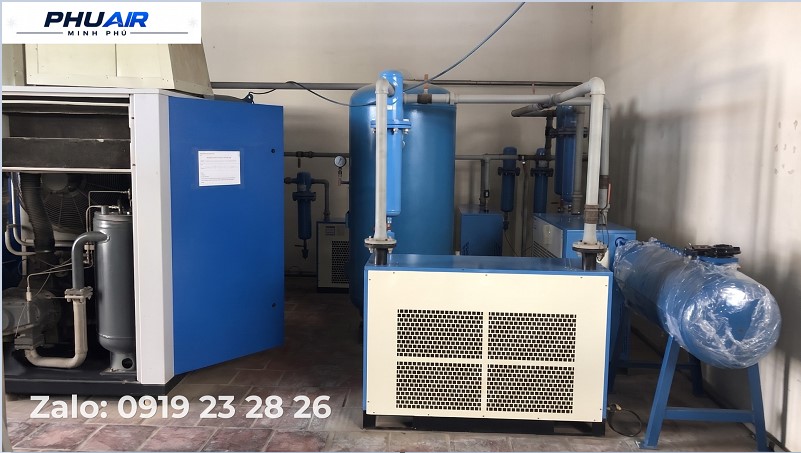
Under normal operating conditions, a screw air compressor can switch between:
LOAD: The compressor draws in and compresses air to supply the system.
UNLOAD: The compressor motor continues running, but the compressor does not intake air at its normal operating capacity.
Example: The Load pressure is set to 6 bar and the Unload pressure is set to 8 bar. When system pressure drops below the Load threshold, the compressor receives a command to switch to LOAD. If the pressure has dropped but the display still shows RUN - UNLOAD, this condition requires inspection.
Note: The compressor being in UNLOAD does not necessarily mean that it has a fault. If system pressure remains above the Load threshold, the compressor not entering the loaded state is completely normal.
2. Signs That the Compressor Is Not Loading
You may suspect a problem if one or more of the following signs occur:
- The motor continues running but the display continuously shows UNLOAD.
- System pressure drops but the compressor does not switch to LOAD.
- The compressor runs for a long time but pressure does not increase.
- The airflow supplied to the equipment is insufficient.
- The compressor frequently operates unloaded.
- The compressor only loads after restarting or resetting.
- There is a Load command, but the Inlet Valve does not operate.
In this case, both the control system and the mechanical/pneumatic components need to be inspected.
3. Step-by-Step Guide to Self-Inspecting a Screw Air Compressor That Will Not Load
Step 1 - Check the Current Pressure
This is the first and simplest step. Check the following three values on the controller display: Current Pressure, Load Pressure, and Unload Pressure.
Example: Current 7.2 bar, Load 6.0 bar, Unload 8.0 bar → In this case, the compressor being in Unload is not necessarily a fault because the pressure is still above the Load threshold.
Conversely, if Current 5.5 bar, Load 6.0 bar, Unload 8.0 bar, but the compressor still shows RUN - UNLOAD, continue with the inspection steps below.
Step 2 - Check the Auto/Manual/Remote/Standby Mode
This is an operating condition that can be checked before intervening with the machine. Check the display or controller to determine whether the compressor is in AUTO, MANUAL, LOCAL, REMOTE, or STANDBY mode. Depending on the machine configuration, the control mode determines how the compressor receives Load/Unload commands. If the compressor is controlled by a central system, also check the Master Controller or Remote signal.
Step 3 - Check Alarm and Fault Status
If the compressor does not load, check the controller display before removing any components. Pay attention to Alarm, Warning, Fault, and Interlock conditions — certain protection conditions or sensor faults may prevent the controller from allowing the compressor to load.
If a fault code is displayed, you should: take a screenshot of the display, record the fault code, do not clear the fault immediately before identifying the cause, and refer to the technical documentation for the correct compressor model.
Step 4 - Check the Inlet Valve
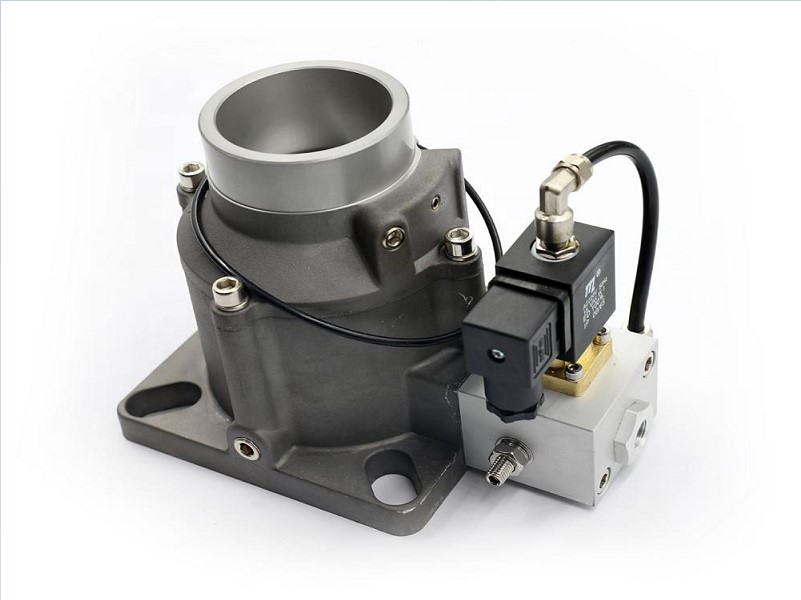
The Inlet Valve is one of the most important components to inspect when the compressor runs but does not load. When the compressor needs to enter Load, the Inlet Valve must operate to allow air to enter the Airend according to the control mode. If the valve is stuck, contaminated, has a faulty actuator, loses its control signal, has a damaged gasket/diaphragm, or does not complete its full stroke, the compressor may continue running but fail to draw in enough air to build pressure.
If the controller has already issued a Load command but the Inlet Valve does not respond, the cause should be narrowed down in the following sequence: control signal → solenoid valve → control air line → Inlet Valve mechanism.
Step 5 - Check the Load/Unload Solenoid Valve
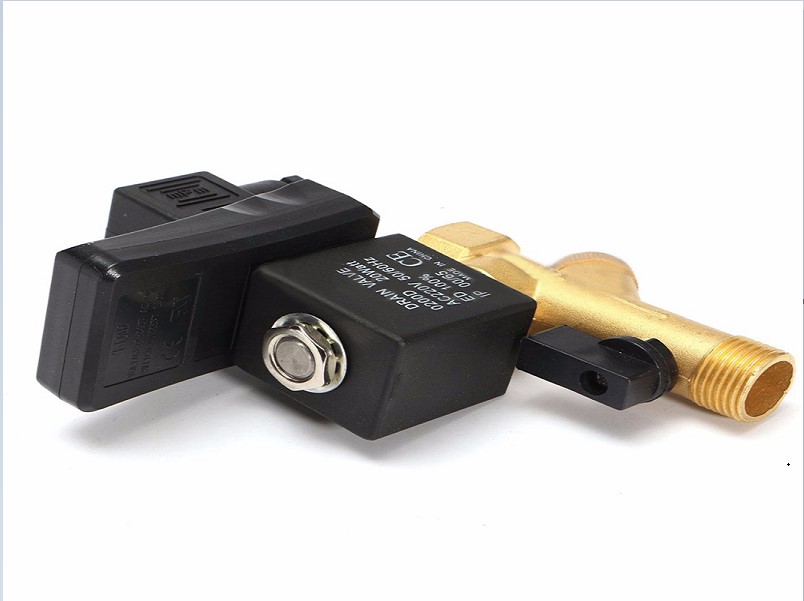
The solenoid valve acts as an intermediary between the controller and the valve mechanism. If the solenoid valve fails, the Load command may not be transmitted to the inlet valve. Common issues include: coil not operating, coil not receiving power, valve sticking, internal contamination, blocked control air line, air leakage, or incorrect supply voltage.
Do not simply replace the coil immediately. It is necessary to determine whether the cause lies in the coil, power supply, control signal, or the valve body itself.
Step 6 - Check the Pressure Sensor
The controller needs an accurate system pressure reading to determine when the compressor should Load or Unload. If the Pressure Sensor reports an incorrect value, the compressor may interpret the pressure as sufficient and therefore not require Load, even though the actual pressure has dropped.
For example: the actual pressure is 5 bar, but the signal received by the controller is 7 bar. If the Load threshold is 6 bar, the controller will not issue a Load command. Therefore, the value shown on the display should be compared with the actual pressure (measured using a mechanical gauge), and the pressure sensing line/sensor should be inspected when abnormalities are observed.
Step 7 - Check the Control Air Line
Some air compressor valve systems use control air. If this air line is blocked, leaking, has insufficient pressure, or contains water, oil, or contaminants, the valve may fail to change state correctly. This cause is easy to overlook because operators often check only the electrical system and forget that the valve also depends on control air.
Step 8 - Check the Downstream Compressed-Air System
Not every case of low pressure originates from the compressor. If the compressor is actually in Load but pressure still fails to reach the required level, check: pipeline leakage, isolation valves, compressed-air filters, air dryer, receiver, or a sudden increase in air demand (for example, when a factory has recently added a production line, causing air consumption to increase significantly and forcing the compressor to run continuously to meet demand).
It is therefore important to clearly distinguish between the compressor not loading and the compressor already being in Load but having insufficient capacity to meet system demand — these two situations require completely different troubleshooting approaches.
4. Quick Inspection Table
Symptom | Component/Condition to Check |
|---|---|
Pressure is higher than the Load threshold. | The compressor may be operating normally. |
Pressure is lower than the Load threshold but the compressor remains in Unload. | Check the Load/Unload control system. |
Machine displays an Alarm/Fault. | Check the fault code and protection conditions. |
Load command is present but the valve does not operate. | Solenoid valve/Inlet Valve. |
Sensor reports an incorrect pressure value. | Sensor and pressure sensing line. |
Valve does not change state. | Control air/valve mechanism. |
Compressor is already in Load but pressure remains low. | Compressor flow rate and compressed-air system. |
Compressor runs continuously. | Check leakage and air consumption demand. |
5. What Should You Not Do Yourself?
When the compressor does not load, do not bypass the solenoid valve, sensor, or protection devices to force the compressor to run. This may disrupt the control logic, disable protection functions, cause the machine to operate outside its design conditions, and make the original fault more severe.
If you do not have electrical and pneumatic expertise, limit yourself to external checks such as pressure, operating mode, and fault codes (Steps 1–3 above).
6. When Should You Call a Technician?
You should contact a technician if:
The compressor has dropped below the Load threshold but still does not load.
The compressor continuously runs in Unload.
The Inlet Valve or solenoid valve does not respond.