

Can a Faulty Air Compressor Contactor Cause the Machine Not to Run? Safe Diagnosis & Troubleshooting Procedure
When starting a production shift, the operator presses the START button on the control panel, but the air compressor does not operate at all, or the electrical cabinet issues an emergency shutdown alarm. One of the core and common causes of this condition is a faulty air compressor contactor (magnetic contactor).
So, how does a faulty contactor affect the system? How do fault codes occur on the control board? Follow the PhuAir engineering team below to understand the technical principles and safe troubleshooting procedure in detail.
What Is an Air Compressor Contactor?
A contactor is an electrical device used to make and break power circuits according to a control signal. In an air compressor, the contactor is located inside the electrical cabinet and is responsible for switching the power supply to the motor or other power circuits, depending on the design of each machine.
The operating sequence is as follows:
Controller - Control Circuit - Contactor - Motor - Air Compressor Operation
When the operator presses START, the controller sends a signal to the control circuit. If all safety conditions are satisfied, the contactor is energized and closes its contacts to supply power to the motor. If the contactor fails, this sequence is interrupted and the motor may not receive power to start.
1. Quick Answer
A faulty contactor can cause an air compressor to fail to start, stop during operation, or generate a protection fault, depending on the control circuit configuration and the type of failure. The contactor serves as an electromagnetic switching device that controls the main power current supplied to the main motor and cooling fan motor.
When the main power contacts are burned, welded, leaking, or when the control coil fails, the machine's central controller (depending on the manufacturer and model) may detect the condition through the feedback circuit/auxiliary contacts. The system immediately locks out the start command and displays warnings or fault codes related to the contactor or feedback signal. Before working inside the electrical cabinet, the technician must completely disconnect the main power supply, apply lockout/tagout (LOTO), and confirm that the pressure in the oil separator vessel has been released to a safe level.
2. Quick Contactor Fault Diagnosis Table for On-Site Inspection
Actual Symptom | Common Displayed Fault Codes (Depending on Model) | Suspected Technical Cause | Standard Corrective Action |
|---|---|---|---|
Press START, the contactor does not pull in, and the machine issues an alarm. | STARTER FAULT, Mains Cont. On? | The contactor coil is faulty; loss of or abnormal control voltage (value depends on the machine design and model). | Check the voltage supplied to the coil; check coil continuity or replace the contactor. |
The contactor repeatedly pulls in and drops out (fluttering) when changing modes. | Answer Error, Abnormal Answer (Some models may display warnings related to Answer/feedback, such as 42/52). | The contactor auxiliary contacts are dirty, damaged, or open-circuit and fail to close electrically. | Check auxiliary contact continuity; inspect and retighten the signal wire terminals. |
The machine performs an emergency shutdown accompanied by an overcurrent or phase-loss fault. | Motor Open Phase, Motor Unbalance | The main power contact surfaces are severely pitted, have poor contact, or are burned/welded, resulting in the loss of one phase. | Measure the three-phase voltage balance downstream of the contactor; replace the main power contact surfaces or replace the contactor. |
The machine stops completely, but the electrical cabinet still displays a feedback fault. | Mains Cont. Off? | The contactor is mechanically stuck or the power contacts are welded even though the control power has been removed. | Isolate the power supply, remove the contactor cover to clean the mechanism, or replace the contactor assembly. |
3. Technical Principle: Starting Operation (Example: Star-Delta Y-Δ)
For machines using the Star-Delta (Y-Δ) starting method, the basic sequence typically occurs as follows:
Star Starting Stage (Y Start): When a start command is received, the main contactor and Star contactor are energized simultaneously to pull in and close their contacts. The main motor starts in the Star configuration to reduce the peak starting current.
Transfer Stage (Y-Δ Transfer): After the preset time delay, the Star contactor releases, and the Delta contactor pulls in and closes so that the motor operates at full load.
Throughout this process, the machine controller continuously monitors the status of the contactors through auxiliary contacts that provide status feedback (Answer/feedback). If a contactor becomes mechanically stuck or its contacts become pitted, the controller immediately activates the protective shutdown command.
4. Groups of Causes That Can Cause an Air Compressor Contactor to Fail
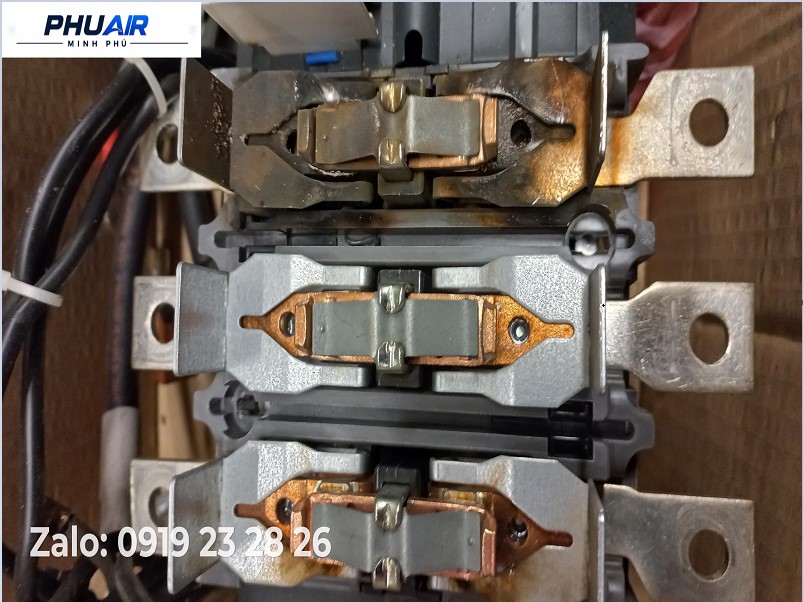
Power Contact Contacts Leaking or Burned and Stuck: Frequent switching under high current generates strong electrical arcing, damaging the contact surface plating and eventually causing pitting and poor electrical contact.
Auxiliary Feedback Contact Fault: Auxiliary contacts may become worn or contaminated with dust, interrupting the control circuit and causing a false feedback fault to appear on the display.
Solenoid Coil Failure: The coil may burn out and break due to control voltage drop, excessive control voltage, or prolonged mechanical vibration, preventing it from attracting the magnetic core.
Loose Wiring Terminals: Loose power or signal wire connections caused by vibration can generate excessive heat, resulting in cable terminal overheating and burning.
5. 5-Step Safe On-Site Inspection Procedure (5-Step SOP)
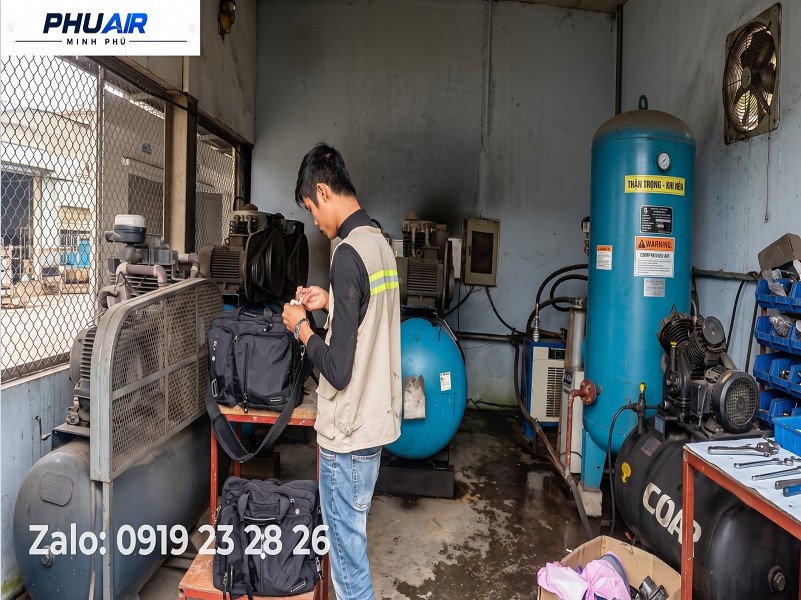
Step 1 - Disconnect Power and Follow the LOTO Procedure: Press STOP to safely stop the machine. Completely switch off the main power supply circuit breaker. Attach a lockout/tagout (LOTO) lock and warning tag at the distribution cabinet to fully isolate the electrical power circuit.
Step 2 - Safely Release Residual Pressure: Only proceed when the pressure gauge on the oil separator vessel indicates a safe pressure level according to the manufacturer's instructions. Performing mechanical disassembly while trapped pressure remains inside can cause serious hazards.
Step 3 - Perform a Visual External Inspection: Visually inspect the contactor, terminals, wiring, and any signs of overheating or burning. Contactor removal or internal circuit measurements must only be performed by a qualified technician after confirming that the equipment is in a safe condition.
Step 4 - Perform an In-Depth Technical Inspection: The technician checks the coil, auxiliary contacts, and feedback circuit according to the electrical schematic for the specific machine model.
Step 5 - Reset the Fault and Perform a Test Run: Close the electrical cabinet cover, restore the control power supply, clear the fault on the control display, and perform a supervised loaded test run.
Operating Mistakes That Must Be Avoided
Do Not Remove or Bypass Electrical Cabinet Protection Devices: Never remove the overload relay or bypass the auxiliary feedback contacts in an attempt to force the machine to run during a production shift, as this may damage the motor and cause a fire.
Check the Motor Insulation Resistance: When the contactor is severely burned or damaged, the motor insulation resistance should be checked according to the manufacturer's requirements and applicable technical standards before power is restored.
7. Frequently Asked Questions (FAQ)
Why does the air compressor contactor vibrate and produce a loud humming noise?
Vibration and unusual noise are commonly caused by dirt or contamination on the contact surfaces preventing the magnetic core from closing properly, excessive voltage drop in the control voltage supplied to the coil, or loose connections in external safety circuits.
Can a fault related to contactor feedback be automatically reset from the display?
No. This is a safety interlock fault. After the mechanical cause has been fully resolved or the faulty contacts have been replaced, the technician must perform the fault reset procedure on the control panel.
Technical Support from PhuAir
Repeatedly resetting faults and forcing an air compressor to operate while experiencing a contactor fault can easily result in phase loss and burnout of the main motor, leading to significant repair costs.
👉 Is your air compressor reporting a contactor fault or failing to start? Send PhuAir a photo of the machine nameplate, the fault code displayed on the screen, and a photo of the electrical cabinet via Zalo. PhuAir technicians will help narrow down the cause and advise on the most appropriate inspection approach for your factory.