

Can a Dirty Screw Air Compressor Cooler Cause High Temperatures?
Quick Answer: Yes. A dirty cooler (oil and air cooling assembly) is one of the leading and most common causes of a screw air compressor high-temperature alarm (High Temperature Trip). When the cooling fins become blocked by dust, textile fibers, or oil and grease mist, heat-transfer efficiency decreases significantly. As a result, the oil and compressed air are not adequately cooled before returning to the Airend. If this condition persists, the machine may trigger a High Temperature alarm, experience abnormal temperature increases, or shut down automatically for protection. However, not every overheating problem is caused by the cooler. The cooler's level of contamination, cooling fan, compressor room ventilation, oil level and condition, thermostatic valve, and other factors specific to the machine's design must also be checked.
1. How Does a Dirty Cooler Affect Temperature?
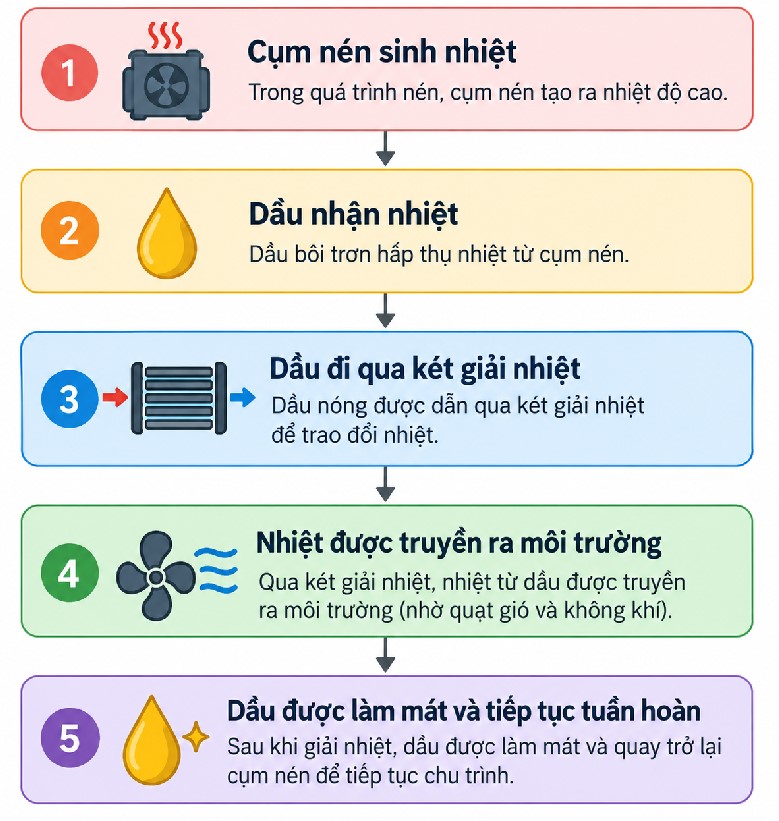
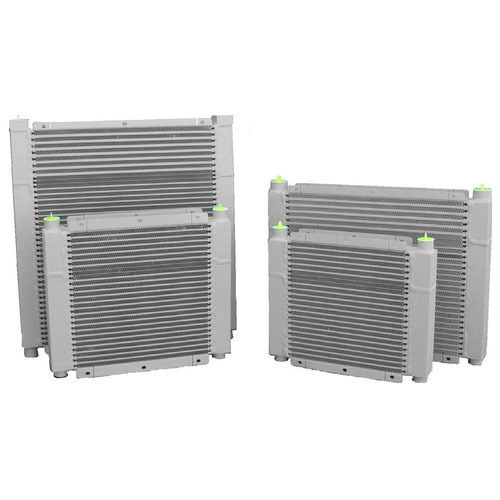
The cooler, commonly known as the oil cooler or oil cooling unit, transfers heat from the oil to the surrounding environment. In a screw air compressor, lubricating oil serves as the primary cooling medium. It absorbs the heat generated during compression and transfers it to the cooler, where the cooling fan dissipates the heat into the surrounding environment. The process can be illustrated simply as follows:
When a factory contains large amounts of dust, wood shavings, cement dust, or textile fibers, the airflow drawn in by the fan carries these contaminants into the gaps between the aluminum cooling fins, where they accumulate. This dust layer acts as a form of “thermal insulation,” obstructing the heat exchange process:
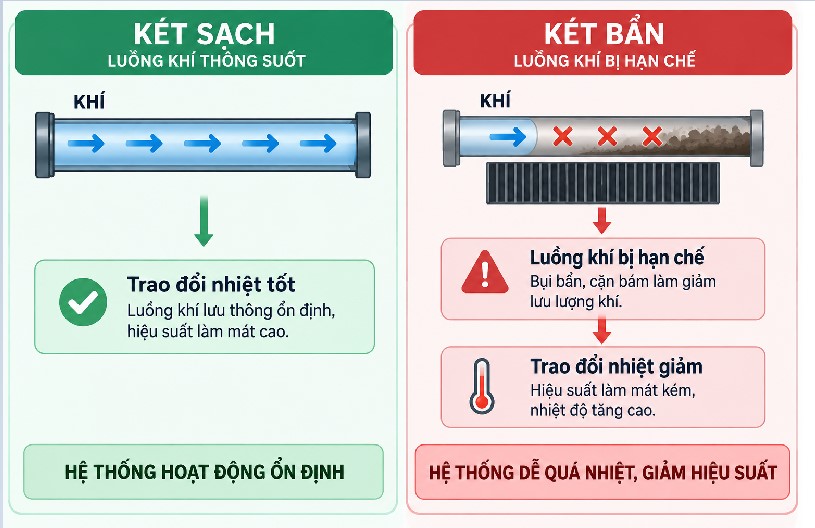
The result is: Dirty cooler → reduced heat dissipation → rising oil temperature → rising system temperature → high-temperature alarm. Oil that is not adequately cooled continues to circulate back to the Airend, causing the system temperature to rise sharply after only a short period of loaded operation.
The extent of the impact depends on the degree of contamination, cooler design, cooling airflow, ambient temperature, and fan condition. Therefore, do not judge whether the cooler needs to be replaced based solely on its external appearance or color.
2. What Commonly Causes Air Compressor Coolers to Become Dirty?
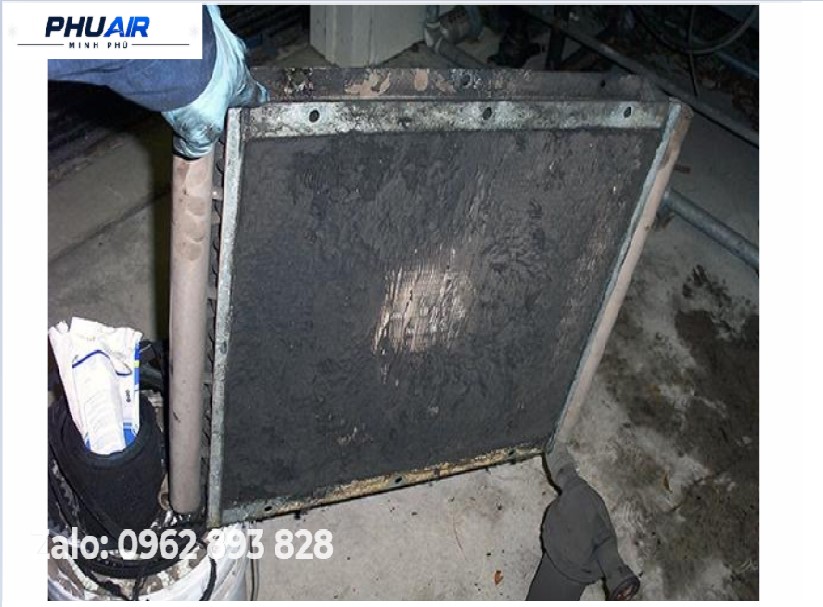
1. Industrial dust – Commonly found in factories with high levels of raw material dust, metal dust, wood dust, cement dust, production dust, and fine airborne particles. These particles accumulate in the cooling fin gaps and restrict airflow.
2. Oil on the cooler surface – Oil on the cooler makes dust adhere more easily, forming a layer of contamination that is relatively difficult to remove. If both dust and oil are found on the cooler, investigate the cause of the oil contamination in that area rather than simply cleaning the surface.
3. Environmental contaminants – Depending on the production industry, the cooler may be exposed to fibers, oil mist, chemicals, particulate contaminants, and moisture. Therefore, cleaning intervals should not be applied rigidly in the same way to every factory.
3. Signs That a Dirty Cooler May Cause High Temperatures
A dirty cooler is not always easy to identify visually.
Signs | What to Check |
|---|---|
Machine temperature gradually rises during operation; the machine shuts down suddenly with a high-temperature fault code (often exceeding approximately 100°C, depending on the model) | Cooler, fan, and ventilation |
The machine frequently triggers a High Temperature alarm | Alarm history and cooling system |
The cooler has significant dust/oil buildup; the cooling fan runs continuously and produces excessive noise | Degree to which the cooling fin gaps are blocked |
The fan is running, but the machine remains hot | Airflow through the cooler |
The machine runs hotter than it did previously | Cleaning history and environmental conditions |
Temperature decreases after cleaning the cooler | Comparison of pre- and post-cleaning data |
The cooler is clean, but the temperature remains high | Check the oil, thermostatic valve, fan, and other possible causes |
Important: The symptom of an overheating machine alone is not sufficient to conclude that the cooler is the cause.
Why Does the Machine Still Overheat When the Fan Is Running?
This situation can easily lead to a misunderstanding. An operator sees the fan rotating and assumes that the cooling system must be functioning normally. However, another important factor must be considered: Is the airflow passing through the cooler effectively?
If dust or oil blocks many of the gaps on the cooler surface, the fan may continue running, but the amount of air passing through the heat-exchange area is restricted. This reduces heat dissipation and allows the temperature to continue rising. Therefore, inspecting the cooling system requires evaluating the fan, airflow path, and cooler surface condition—not simply checking whether the fan is rotating.
Can a Dirty Cooler Trigger a High Temperature Alarm?
Yes, it can. If cooling performance deteriorates to the point that the temperature exceeds the system's control limit, the controller may trigger a high-temperature alarm. However, alarm thresholds are not the same for every machine. They depend on the manufacturer and model, Airend design, oil type, cooling system, ambient conditions, and controller settings. Therefore, when a High Temperature alarm occurs, record the alarm code and actual temperature, then compare them with the documentation for the specific model.
3. How to Inspect a Screw Air Compressor Cooler
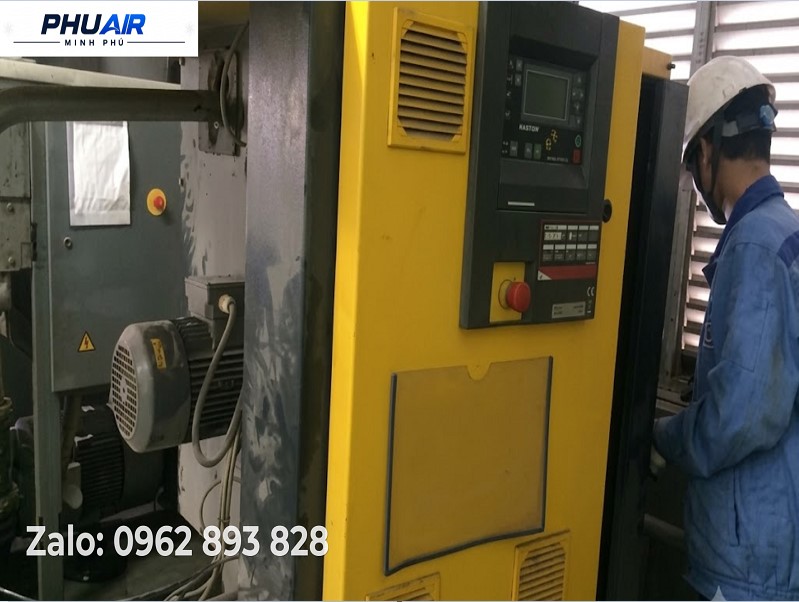
Step 1 – Record the alarm details: Record the alarm code, displayed temperature, time when the alarm occurred, how long the machine had been running, whether the machine was in LOAD or UNLOAD mode, and the ambient temperature if data is available. This information is useful when comparing conditions before and after cleaning.
Step 2 – Visually inspect the cooler: Check whether the surface is covered with dust, whether the cooling fins are obstructed, whether oil has accumulated, whether anything is blocking the airflow, and whether the cooling fins show signs of deformation or damage. A thin layer of dust may have a very different impact from a situation in which the fins are almost completely blocked.
Step 3 – Check the fan: Check whether the fan is operating, whether it produces any unusual noise, whether the fan blades are damaged, whether the airflow direction is correct, and whether anything is obstructing the front or rear of the fan. On some machines, the fan is controlled according to operating conditions, so its behavior must be checked against the design of the specific model.
Step 4 – Check compressor room ventilation: Even if the cooler is clean, the machine may still experience high temperatures if the compressor room is too hot or hot air is recirculating. Check whether hot air from the machine is discharged outside and whether it flows back into the cooling air intake area. If hot-air recirculation occurs, the ventilation system must be addressed rather than simply cleaning the cooler.
Step 5 – Check the surrounding space: Ensure that no obstructions block the areas in front of or behind the cooler, allowing hot air to escape easily.
4. How Should You Clean an Air Compressor Cooler?
The cleaning method depends on the cooler's design and the manufacturer's instructions. As a general principle, follow these steps:
1. Stop the machine and follow safety procedures: Completely disconnect the electrical power supply, isolate energy sources according to the applicable procedure, release all residual pressure, ensure that no hazardous pressure remains in the machine, and wait until all components are safe to handle. Do not clean or remove components while the machine is running or while hazardous pressure remains.
2. Identify the type of contamination: Determine whether the cooler is contaminated with dry dust, dust mixed with oil, fibrous debris, or scale deposits. The same cleaning method should not be used for every type of contamination.
3. Clean using the correct technique: Use compressed air together with a specialized cleaning solution, blowing against the normal airflow direction to push contaminants out. If the cooler has heavy oil contamination, water at moderate pressure may also be used with a degreasing solution. Always spray along the length of the cooling fins. Do not spray at an angle or use excessively high pressure, such as that produced by a car-washing pressure washer, as this can bend, dent, or break the thin aluminum fins, reducing airflow through the cooler afterward.
4. Check the surrounding space: Ensure that no obstructions are present in front of or behind the cooler, allowing hot air to escape easily.
5. Inspect the machine after cleaning: Check the cooler surface, airflow, and fan. Operate the machine according to the prescribed procedure and monitor its temperature again. If data is available from before and after cleaning, record it to evaluate the effectiveness of the work.
Not Every Overheating Problem Is Caused by the Cooler
This is a critical point in troubleshooting. If the cooler is clean but the machine still triggers a high-temperature alarm, expand the inspection to include:
Oil level – Is it below the required level?
Oil condition – Has the oil reached its replacement interval? Is the correct oil type being used?
Oil filter – Is it due for replacement, or are there any signs of abnormal operation?
Thermostatic/bypass valve – Is it operating according to the design specifications?
Fan – Is it actually generating sufficient cooling airflow?
Ventilation – Is hot air being trapped in the compressor room?
Cooling water system – Applicable to water-cooled machines.
Operating conditions – Is the machine operating in an unusual environment or under abnormal load conditions?
5. Quick Troubleshooting Table
Symptom | Potential Cause or Area to Check |
|---|---|
Cooler covered with dust | Reduced heat transfer |
Cooler contaminated with dust and oil | Restricted airflow; check the source of the oil contamination as well |
Fan not running | Cooling system |
Fan running but cooler fins blocked by dust | Airflow through the cooler |
Compressor room is very hot | Ventilation |
Hot air flows back toward the machine | Hot-air recirculation |
Low oil level | Oil system/leaks |
Oil has not been changed for a long time | Oil condition and maintenance |
Cooler is clean but the machine still overheats | Expand the troubleshooting scope |
Water-cooled machine overheats | Water temperature/flow rate and heat exchanger |
How Often Should an Air Compressor Cooler Be Cleaned?
A single fixed interval should not be applied to every factory. The cleaning interval depends on the amount of dust in the environment, the industry and production processes, machine operating hours, installation location, ventilation system, and the actual condition of the cooler. For example, machines operating in dusty environments (such as those containing wood dust, cement dust, or textile fibers) may require more frequent inspection and cleaning. In practice, many dusty workshops use a reference interval of approximately once every 1–3 months, while machines installed in clean rooms may be maintained at longer intervals.
A better approach is to establish a maintenance schedule based on the manufacturer's recommendations + actual operating conditions + temperature history + cooler condition, rather than mechanically applying the same interval to every machine.
6. Five Common Mistakes When Dealing with a Dirty Air Compressor Cooler
Waiting until the machine triggers a high-temperature alarm before cleaning – The cooler should be inspected and maintained before dirt buildup causes a fault.
Checking only the fan and ignoring the cooler – A running fan does not necessarily mean that heat exchange is working effectively.
Using excessive pressure or spraying in the wrong direction during cleaning – This may bend, dent, or break the cooling fins if the cleaning method is unsuitable. (Spray against the airflow direction and along the length of the aluminum fins. Do not use a high-pressure washer of the type used for car washing.)
Cleaning the cooler without checking the temperature afterward – Monitor operating data after maintenance to determine whether the condition has actually improved.
Concluding that a “dirty cooler” is the only cause – A high-temperature alarm can have several causes; the cooler is only one area that needs to be checked.
7. Frequently Asked Questions (FAQ)
1. Can a dirty air compressor cooler cause the machine to overheat?
Yes. Dust, oil, and contaminants accumulated on the cooler can restrict airflow and reduce heat-transfer efficiency, causing the operating temperature to rise.
2. Can a dirty cooler trigger a High Temperature alarm on an air compressor?
It can. If heat dissipation deteriorates significantly, the temperature may rise to the machine's alarm threshold. However, other possible causes should also be checked before drawing a conclusion.
3. Why does the temperature remain high even though the air compressor fan is running?
The cooler may be dirty, airflow may be obstructed, the compressor room may be too hot, or another part of the cooling system may be malfunctioning. The fan, cooler, and ventilation system must all be checked rather than simply confirming whether the fan is rotating.
4. Should a high-pressure water jet, such as a car-washing pressure washer, be used to spray the cooler directly?
Avoid using excessively high pressure, such as that produced by a car-washing pressure washer. Water at moderate pressure may be used together with a degreasing solution for a cooler with heavy oil contamination. However, spray along the length of the cooling fins to prevent the aluminum fins from becoming dented, deformed, or broken. The appropriate method must be based on the cooler's design and the manufacturer's instructions; it should not be assumed to apply to every type of cooler.
5. What should you do if the machine remains hot after cleaning the cooler?
Expand the inspection to include the fan, ventilation, oil level, oil condition, oil filter, thermostatic/bypass valve, and cooling water system if the machine is water-cooled.
8. Conclusion
A dirty screw air compressor cooler can certainly cause the machine's temperature to rise. The mechanism can be summarized as follows: dust/oil buildup on the cooler → reduced heat exchange → oil is not cooled effectively → system temperature rises → a High Temperature alarm may occur.
However, do not draw a conclusion based on a single symptom. When the machine triggers a high-temperature alarm, inspect the following areas systematically: Cooler → Fan → Airflow → Ventilation → Oil Level → Oil Condition → Oil Filter → Thermostatic Valve → Cooling Water System → Operating Conditions.
PhuAir Supports Air Compressor Cooler Inspection and Cleaning
If your air compressor frequently triggers high-temperature alarms and you suspect that the cooler is contaminated, please send PhuAir the following information:
📷 A photo of the machine's nameplate
🖼️ Photos showing the actual condition of the cooler surface and cooling fan area
🌡️ The exact temperature displayed on the controller before the machine shuts down
🛠️ The current operating hours and the date of the most recent scheduled maintenance
The PhuAir technical team can help inspect the cooler, cooling system, and related potential causes to determine the appropriate corrective action rather than replacing parts based on guesswork.